

 Post by

While WordPress is a secure platform with a ton of developer support to patch any security holes, there is no way to make your site universally immune to hackers, bots and other forms of cyber attacks. As mentioned in our article “5 Easy and Essential WordPress Tips to Make Your Site Secure”, there are many quick and easy tactics that can add new layers of security for our site. In this article, we’ll outline one of the easiest, yet most effective means of preventing unwanted users from accessing your site – limiting the amount of times WordPress users can attempt to login.
Why Limit Login Attempts in WordPress?
One of the most common hacking attacks attempted by both hackers and bots is by trying a large amount of username and password combinations to see if something works. This is a knock intended as a brute force attack. By restricting the number of login attempts that a certain IP address can try, you can cut these attacks in the process. Once your website notices that the same IP address has attempted to login using a wrong username/password combination, the site will block them from future tries for a period of time.
Step 1. Install the Plugin “Limit Login Attempts Reloaded”
While there are many quality plugin options with the ability to limit user logins, the plugin Limit Login Attempts Reloaded is our recommended choice. With over 2 million active installations, a free version with everything you need, and an average user rating of 4.9/5, it’s easy to see why.
To install the plugin, navigate to the Plugins section of your WordPress dashboard, click the “Add New” button and then search for “Limit Login Attempts Reloaded.”
Once you add the plugin, click “Activate” and you’ll be ready to go.

Step 2. Edit the Plugin Settings
You should now see a link called “Limit Login Attempts” in your WordPress menu. Move your mouse to this link, then click “Settings” within the dropdown menu.
From here, we can edit the basic settings you’ll need to secure your site.
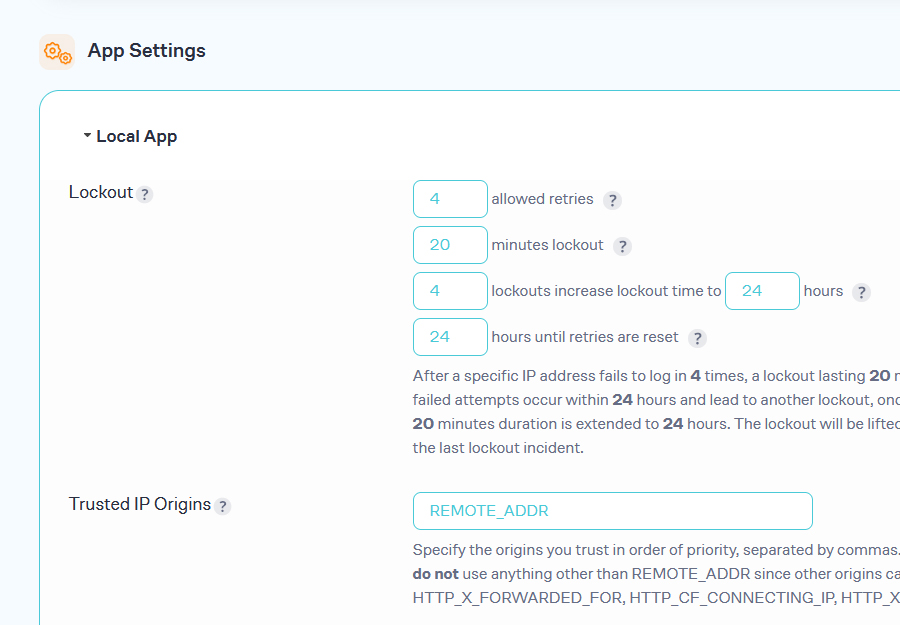
Navigate to the App Settings > Local App section. This is where you can edit all of the necessary settings to limit your login attempts.
- Allowed retries
- Minutes lockout
- Lockouts increase lockout time
- Hours until retries are reset
The default settings are very good, but feel free to adjust them to be more strict or forgiving depending on your users and staff who access the website.
Conclusion
Restricting the number of login attempts that users can try on your WordPress website will make your site more secure. It’s a super easy tool that should make you feel safe knowing that brute force attacks by bots and hackers will be shut down very fast as opposed to having unlimited attempts by default in WordPress.




