

 Post by
What is an XML Sitemap?
An XML sitemap is a file on your website that lists all the pages on your site that you want search engines like Google to index. While search engines generally index pages by looking at your site and seeing what links are visible, an XML sitemap helps search engines find all the pages easily and tells them additional, important information, like which pages have been recently updated.
What is XML?
According to W3 Schools, XML, also known as Extensive Markup Language, is a markup language that is used to store and transport data. It is not like other programming languages that run and process code; it doesn’t even have predefined tags like you see in HTML and other languages. XML simply exists to store and display data in whatever method the author prefers. And that is all you really need to know!
What does an XML Sitemap look like?
While XML does not have any predefined tags, an XML sitemap uses a standardized method of displaying website content, which allows search engines to discover them.
Here is a very basic example of what you may see if you view an XML sitemap:
<?xml version=”1.0″ encoding=”UTF-8″?>
<urlset xmlns=http://www.sitemaps.org/schemas/sitemap/0.9>
<url>
<loc>https://yourwebsitename.com/</loc>
<lastmod>2023-08-</lastmod>
</url>
Does Google require an XML Sitemap?
The simple answer to this question is no, but you should still use it!
Google’s documentation says that sitemaps are helpful for “really large websites” and other similar criteria. With that being said, Yoast, the company behind the biggest SEO plugin for the WordPress platform, says:
While we agree that these websites will benefit the most from having one, at Yoast, we think XML sitemaps are beneficial for every website. Every single website needs Google to be able to find essential pages easily and to know when they’re last updated. That’s why this feature is included in the Yoast SEO plugin.
Mike Hendriks – Yoast.com
So, why should you use XML?
- Whether doing it yourself or using online sitemap generators and other tools, it’s quick and easy.
- Having an XML sitemap will not hurt your site!
- No matter how complex your site structure may be, your sitemap will ensure that every page on your website is viewable.
XML Sitemap Best Practices
1. Only include URLs you want to have indexed by search engines.
2. Ensure your file size is less than 50MB and under 50,000 URLs (Source: https://developers.google.com/search/docs/crawling-indexing/sitemaps/build-sitemap)
3. Only include links you can view – no redirects or 404 error pages.
4. Use UTF-8 encoding.
5. Use proper XML sitemap formatting. To read more about the protocol, visit the documentation on sitemaps.org.
6. Update your sitemap every time you add a new URL or update a URL that already exists on your sitemap.
7. Submit your sitemap to Google Search Console.
How to Generate an XML Sitemap
Generating an XML sitemap is super easy! If you use any of the below popular CMS platforms, they already generate and update your sitemap automatically!
- WordPress
- SquareSpace
- Wix
If you’re not using a CMS, it’s just as easy to generate a sitemap for your website. We could include a long list of potential XML sitemap generators; we personally recommend using XML-Sitemaps.com to generate a sitemap in just a few clicks.
How To Submit Your XML Sitemap to Google (Search Console)
Google Search Console is a MUST-use tool! While Google will eventually pick up your sitemap on its own if you use the proper XML sitemap formatting mentioned above, submitting it to Google is highly recommended. Not only will it make Google find your links quicker, but it will also give you a ton of insights into the links on your site and issues Google has with your site/sitemap.
The following steps assume you already have a Google Search Console account setup. If you do not, follow the Google prompts, and you will have it set up in minutes!
1. Log in to Google Search Console.
2. Select your website from the Property list.
3. Click the “indexing > Sitemaps” link in the dashboard.
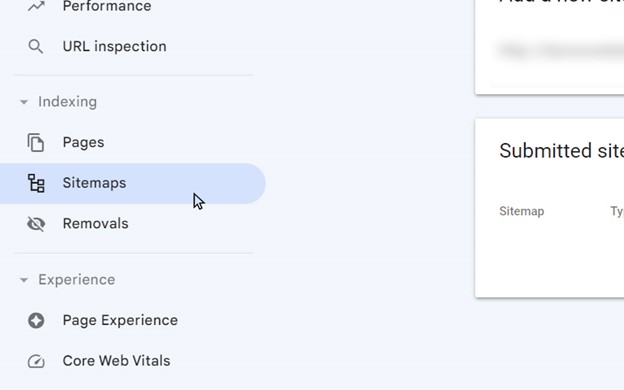
4. Enter the URL to your website’s XML Sitemap.

That’s it! It can take up to a few days for Google to process your sitemap. You can check back to see if the “Submitted sitemaps” Status is changed to a green “Success”!
Review Your Website’s XML Sitemap!
Now you know the ins and outs of having an XML sitemap on your website. When done correctly, Google and other search engines will easily access all the pages and content you want them to without missing anything! So, go check out your website’s XML sitemap or create one today!
Need help? Our developers are here to assist! Just give us a call at 610-337-8484.




