

 Post by

Scrolling banners (also known as sliders or carousels) are common design elements that can be seen all over the web. According to a study by Nielsen Norman Group, only 1% of users interact with carousels, making them an ineffective way to present critical information. The appeal is easy to understand – scrolling banners add a little motion to the web page and can pack a lot of content in a relatively small area. Unfortunately, research from the Nielsen Norman Group and ConversionXL has shown that scrolling banners, while good in theory, do not live up to their expectations. Studies indicate that users often ignore them, with click-through rates as low as 1%. User interface specialists have been advising against this design pattern for a good reason.
If you’re looking for a modern, high-performing website that avoids common usability pitfalls, our web design services can help you create an engaging and effective online presence with fast load times, intuitive navigation, and a user-centric approach.
Reasons to Reconsider Scrolling Banners
1. Most users skip the rotating banner and scroll right to the main content.
Website visitors often overlook the banner content as they perceive it as an “ad.” Modern web users are savvy enough to intentionally ignore the very first marketing message that jumps at them upon entering a website, so the carousel content simply gets ignored.
2. Most slides in the carousel will never get viewed.
The only slide that will really get viewed is the very first one. All subsequent slides will almost always get overlooked, even when the carousel has clear navigation.
3. Carousels are heavy on the web browser and require a lot of resources.
Since scrolling banners are usually placed high on the page, each slide has its own image to load. So, the first thing the browser is working on as the page loads is downloading multiple large images. Additionally, the scrolling script must get loaded onto the page to provide the proper functionality, so that’s another speed bump. This hurts the page load speed and might harm users’ first impressions of your website.
4. Scrolling banners are not fully accessible.
Carousels are notorious for having poor accessibility, especially the auto-scrolling ones. Automatically hiding a message or replacing it with a different one might be perceived as misleading, but more importantly, it is against the Web ADA compliance guidelines. To ensure your website meets accessibility standards, our ADA compliance services can help make your site more inclusive.
Best Practices for Scrolling Banners
If you choose to go ahead with adding a carousel to your website, keep the following tips in mind:
- Add clear navigation as a way for users to control the slider’s behavior. If you choose to auto-rotate the slides, there must be a way to stop the animation by clicking a “pause” button or by simply hovering the cursor over the slide.
- All images used need to be properly sized and optimized, especially full-screen images. Ideally, script and styling files should be minimized to reduce the load on the web browser.
- Don’t display any important information or calls to action on any slides past the first. If the content is important enough to be one of the first pieces of information you need to convey, it deserves its own page or perhaps a section on the homepage.
For example, Apple’s website effectively uses a scrolling banner by limiting the number of slides, keeping messaging concise, and ensuring each slide has a strong call to action. Their approach ensures that key product highlights are not lost while maintaining an engaging user experience.
Alternatives to Scrolling Banners
1. Use a single (static) image with a clear message and call to action
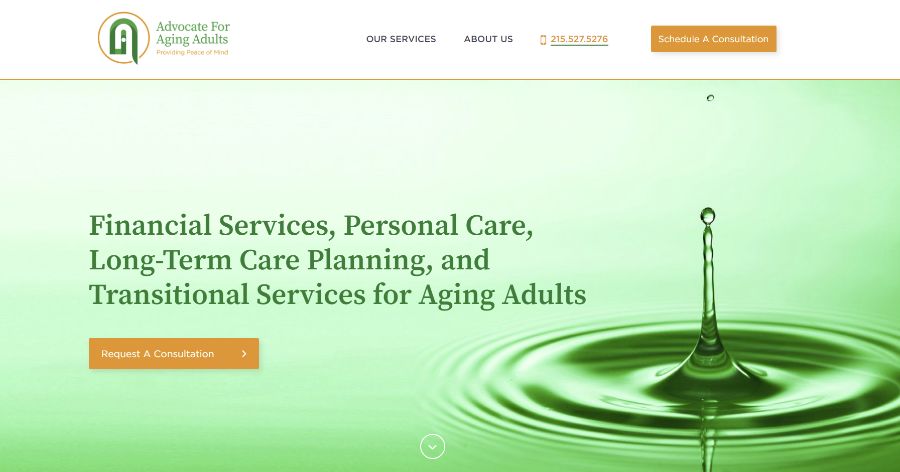
Website example: Advocate For Aging Adults
2. Minimize the banner and jump right into the content

Website example: Elon Development
3. Use a video background

Website example: CCS Pools
4. Use a grid to display multiple calls to action/content block
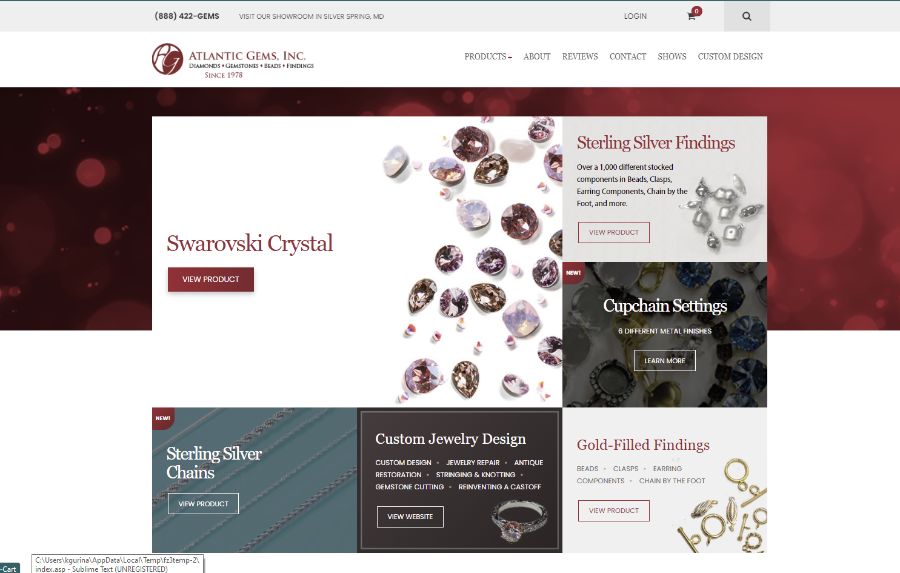
Website example: Atlantic Gems
Ultimately, whether or not you include a carousel on your website, the most important thing is that your message is clear and your site is user-friendly. A well-designed website should prioritize user experience, performance, and accessibility to ensure visitors can easily find and engage with your content.
If you’re unsure about the best approach for your website, our team at AGM Solutions specializes in creating high-performing, user-friendly websites that drive engagement and conversions. Whether you need a complete website redesign, optimization for speed and accessibility, or a custom development solution, we’re here to help. Contact us today to discuss how we can enhance your online presence.




